When two guards ask to exchange assigned shifts, keep the request separate from the roster until a decision is recorded. The Guard Sheets security guard shift swap request tracker is an Excel workbook for logging both assignments, recording checks, and reviewing requests awaiting approval.
Use it to organize paired swaps, not recruit guards for open shifts. Its calculated review results depend on the information you enter; approval does not change the roster or notify the guards.
Where this workbook helps
- Keep both sides of an exchange in one record so the receiving guard and post are clear.
- Separate requests ready for a decision from those needing checks or corrections.
- Keep recorded eligibility, consent, schedule review, and approval details together for handover.
- See each original shift’s planned duration without treating exchanged hours as new coverage.
What is in the file
How to get started
1. Set the working assumptions
On Assumptions, confirm the Site-local time basis and enter your company’s receiving-post, other-assignment, overtime, break, and staffing criteria. Update the guard, post, and reviewer reference lists in columns D–F. These lists supply dropdown choices; they do not verify eligibility.
2. Prepare a live working copy
Save a separate copy before replacing the fictional examples. Requests rows 2–11 contain fictional records, including intentional exceptions. Clear their input values and example notes when preparing a live file, but preserve calculated columns R:T. Otherwise, the examples remain part of the Review counts.
3. Record the paired request and checks
In Requests, enter a unique Request ID, Logged date, two different guard IDs, original posts, and full dated shift starts and ends. Record the receiving-post eligibility checks, Both guards consent, and Manual schedule and pay review using the dropdown values. Leave Decision as Pending while the decision is outstanding.
4. Review, decide, and update separately
Use Review to choose a queue, then filter Review result in Requests column T. Resolve missing information before acting. For approval, enter Decision reviewer ID and a numeric Decision date no earlier than Logged date, with the required checks recorded. After reviewing the approved record, update the roster and communicate the change through your normal process.
Keep the exchange direction clear
Enter the assignments as they exist before the proposed swap. Guard A receives shift B, and Guard B receives shift A. Original post A and Original post B describe the original assignments; do not reverse those entries to represent the proposed roster.
One record exchanges two existing assigned shifts. If you have an uncovered post and are looking for someone to take it, this is not the appropriate request structure. The workbook does not recruit relief guards, match available guards, or calculate coverage gaps.
Before recording checks, compare both original assignments with your current roster. A correct-looking swap record can still be based on an outdated assignment. The tracker does not detect that mismatch for you.
Record receiving-post checks without treating them as verification
Check each guard against the post they would receive. Guard A eligibility for post B and Guard B eligibility for post A are separate fields because a recorded pass in one direction does not establish suitability in the other.
Use the company-entered criteria on Assumptions to guide the work outside the spreadsheet. Review other dated assignments and applicable pay, break, and staffing requirements before marking Manual schedule and pay review as Complete. Record Both guards consent as Yes only when that consent has been obtained through your process.
Pass is a recorded judgment, not an automated verification. The file does not check qualifications, licensing, scheduling conflicts, or legal compliance. Editing an assumption also does not perform those checks or calculate overtime. If a check remains unresolved, use the appropriate Pending, Fail, No, or Issue value rather than marking it complete to move the request forward.
Fictional example: an overnight swap ready for a decision
The included fictional record FICTION-SWAP-01 pairs FICTION-GUARD-01 at Fiction Post A with FICTION-GUARD-02 at Fiction Post B. Shift A runs from 10/05/2026 8:00 PM to 10/06/2026 6:00 AM. Shift B runs from 10/06/2026 8:00 PM to 10/07/2026 6:00 AM. Both use the fictional America/New_York site-local time basis.
The planned-hours formulas subtract each dated start from its end and multiply the difference in Excel days by 24. The result is 10.00 planned hours for each shift. Both receiving-post checks are Pass, consent is Yes, manual review is Complete, and Decision is Pending. After recalculation, Review result is Ready for approval.
That result means the recorded inputs are ready for the scheduler’s decision—not that the exchange has been approved. Review the request, then record the decision and any required approval details. These hours describe the assignments being exchanged; adding them together would not show additional coverage.
Always include the next day’s date for an overnight end time. The calculation uses nominal clock hours, so reconcile daylight-saving transitions and other time zones manually. Planned hours do not establish attendance, paid hours, or billable hours.
Read the approval queue, not just the pending total
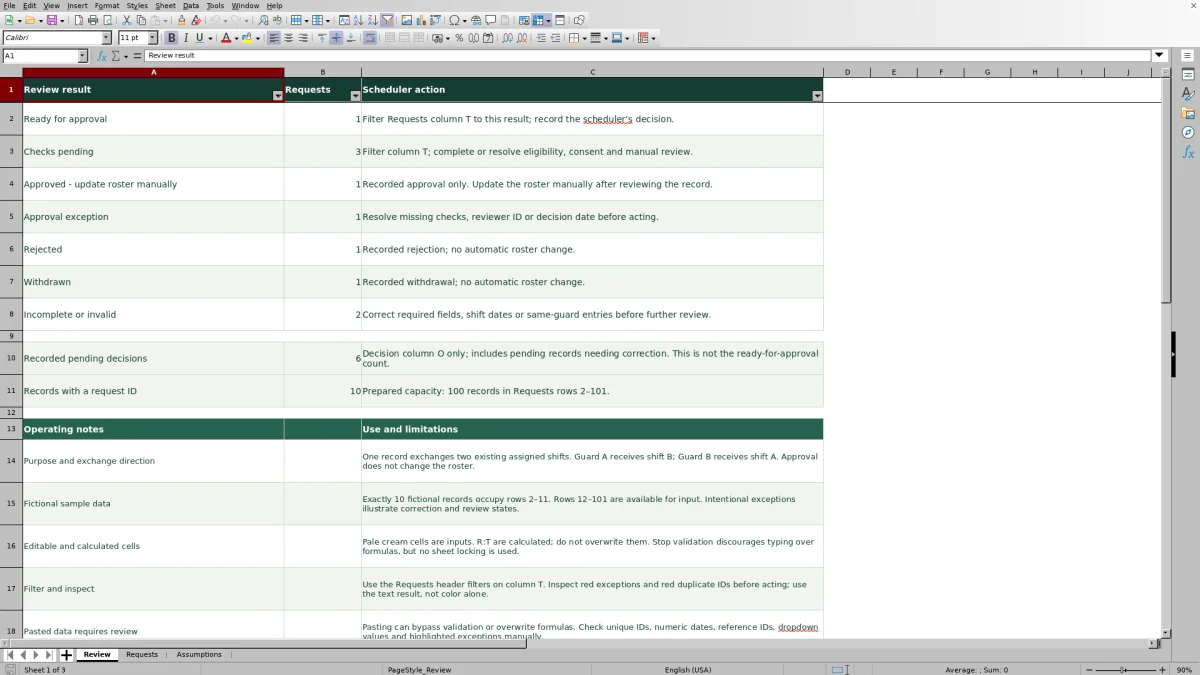
Use Ready for approval when you want requests whose recorded checks are complete and whose decision is still pending. Use Checks pending to find requests that need eligibility, consent, or manual review resolved. Incomplete or invalid identifies records that need basic input corrections before further review.
Recorded pending decisions is not the approval-ready count. That total counts rows with a Request ID and Pending in Decision, including records needing correction. In the unchanged fictional sample, the expected pending total is 6, while only 1 request is Ready for approval. Use the result categories to decide what work comes next rather than treating all pending requests alike.
Approval exception calls for review of missing checks, reviewer ID, or decision date before acting. Approved - update roster manually identifies a recorded approval, not proof that the roster has been changed. Rejected and Withdrawn record those decisions without changing assignments.
Filter Requests column T to inspect the underlying records. Read the text result as well as any red highlighting; color alone is not enough to decide what needs attention.
Troubleshooting dates, duplicate IDs, and approval exceptions
- Blank planned hours: Check that both shift dates are numeric Excel date/time values and that the end is later than the start. A blank result is not a zero-hour shift. Correct text dates or an overnight end entered on the wrong day, then recalculate.
- Incomplete or invalid: Inspect required fields from Request ID through Decision, the four shift date/time entries, and the two guard IDs. The same guard cannot occupy both sides of the exchange.
- Duplicate Request ID: Inspect red duplicate-ID highlights and establish whether the row repeats an existing request. Correct the identifier or remove the duplicate input record as appropriate; do not assume Review result resolves duplicate IDs.
- Approval exception: Check that both eligibility fields are Pass, consent is Yes, and manual review is Complete. Also enter a Decision reviewer ID and a numeric Decision date that is not earlier than Logged date.
- Unexpected results after pasting: Inspect reference IDs, dropdown values, dates, and formulas in R:T. Pasting can bypass validation or overwrite formulas. Restore damaged calculated cells from an untouched copy before relying on the summary.
The workbook uses input validation, but its sheets are not locked. Validation discourages some typing errors; it is not a substitute for inspecting pasted data and highlighted exceptions.
Carry an approved swap through the roster handover
After a request reaches Approved - update roster manually, apply the exchange in the roster you actually use to assign guards. Confirm that Guard A now receives shift B and Guard B receives shift A, then communicate the revised assignments through your established process.
The calculated approval result does not confirm that either action happened. There is no dedicated roster-update completion field in this tracker. If your process calls for a brief handover reference, use Non-sensitive notes, but keep sensitive personnel details, site access information, and incident details out of it.
Keep a dated copy before changing an already-decided request when you need to preserve the earlier record. Do not rely on the workbook as an automatic change history. At handover, distinguish unresolved requests from approved records that still require roster action so the next scheduler knows which task remains.
Compare the tracker with a paper swap request log
Both methods can support a manually controlled swap process. Choose based on whether you need calculated queues and shift durations or a written record you will review and total by hand.
| Method | Request detail | Review workload | Shift duration | Roster follow-through |
|---|---|---|---|---|
| Guard Sheets Excel tracker | Prepared fields for both assignments, recorded checks, and decision details. | Calculated result categories and counts, with filters for inspecting requests. | Calculates nominal planned hours from valid dated starts and ends. | Requires a separate manual roster update and communication process. |
| Paper swap request log | Can record the same information when the form provides space for it. | Requires reading entries and manually counting unresolved requests. | Requires a separate calculation or written duration. | Requires a separate manual roster update and communication process. |
Use the Excel tracker when filtering a queue and keeping consistent fields will help your scheduling desk. A paper log may suit a process centered on written requests with a manageable review volume. Neither method, by itself, verifies receiving-post eligibility or carries an approval into the active roster.
Frequently asked questions
How many swap requests can the workbook hold?
The prepared range is Requests rows 2–101, for 100 records. Ten fictional examples initially occupy rows 2–11, leaving rows 12–101 available for input. Replacing the fictional inputs makes the full prepared range available. Do not assume entries below row 101 are included: the supplied Review formulas use fixed ranges ending at that row.
Does the workbook calculate overtime costs or billable changes?
No. It calculates planned shift durations, not USD compensation, overtime premiums, or client charges. Apply your company’s applicable rules outside the workbook before recording Manual schedule and pay review as Complete. Equal shift durations alone do not establish that a swap has no pay effect.
Do the fictional shift dates move when I open the file?
No. Next Monday reference on Assumptions is a rolling formula, but the example shift dates are saved values. Changing the example-generation assumptions does not reschedule those records. Enter the actual dated assignments for each live request.
Should I recalculate the workbook before using the summary?
Yes. Open it in Excel or LibreOffice to recalculate and inspect the results before using the counts for a handover. The supplied checks covered workbook structure and a separate reference model; they did not run an Excel calculation engine. Review includes expected fictional sample counts you can use to check an unchanged copy.
Can one guard give away a shift without receiving another?
That is outside this workbook’s paired-exchange structure. Each record requires two different guards and two existing assigned shifts. Use a separate process for a one-way reassignment or open-shift request rather than entering a dummy guard or shift to force it into this tracker.
Editorial coverage

Naomi WestbrookScheduling & contract records

Adrian MercerPatrol & operational records