When relief is late or a handover is still open, you need to separate recorded arrivals from changeovers that need follow-up. Guard Sheets’ Security Shift Relief Tracker is an Excel workbook for recording planned relief, actual arrival and handover completion at physical security posts.
Use it to calculate recorded late minutes and prepare a manual follow-up list by post. Results depend on your entries and the review timestamp you update; the workbook does not monitor attendance, dispatch guards or send notifications.
Where this workbook helps
- Separate recorded late arrivals from relief that has not yet been recorded.
- Review open handovers independently of whether the incoming guard has arrived.
- Filter threshold-based action labels by post to organize manual follow-up.
- Identify input errors before relying on the operational totals.
What is in the file
How to get started
1. Set the review time and operating assumptions
On Assumptions, enter the Manual review timestamp in B2. Set the awaiting-relief and unresolved-handover thresholds in B3:B4 as positive whole minutes. These are your operational assumptions, not legal standards. Replace the fictional post choices in D2:D5 with your post labels.
2. Replace the fictional examples with changeover records
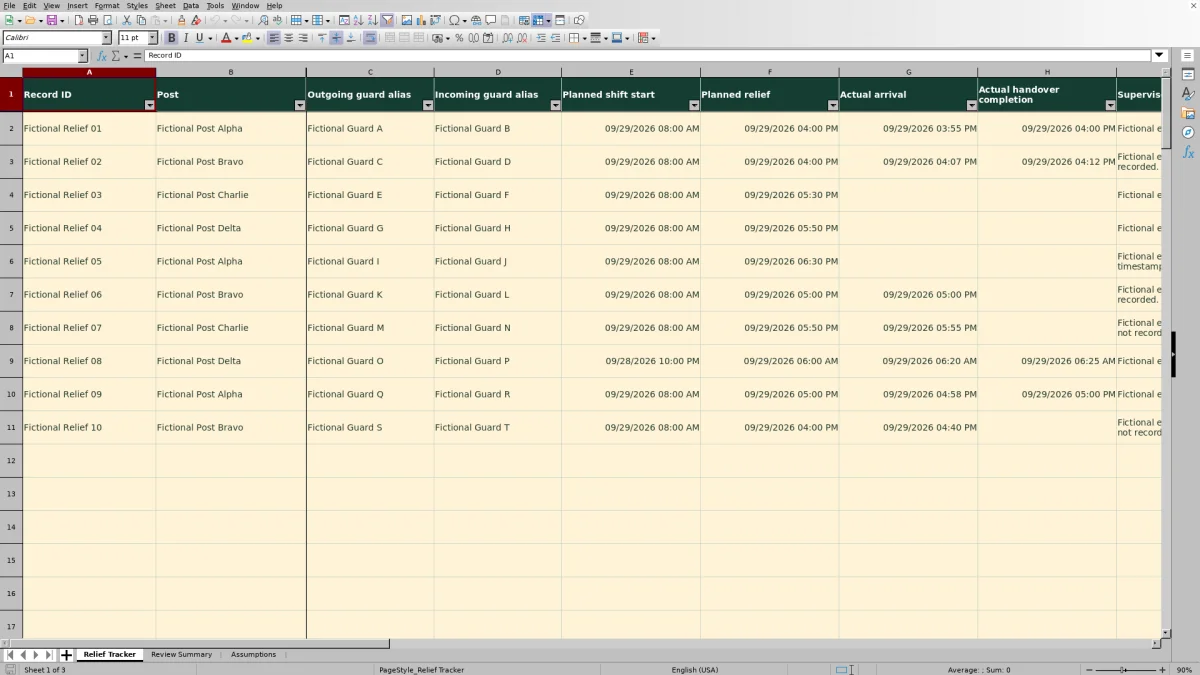
On Relief Tracker, replace the fictional inputs in rows 2–11 before operational use. Rows 12–101 have empty input cells. Enter a unique Record ID, Post, Outgoing guard alias, Incoming guard alias, Planned shift start and Planned relief in columns A:F. Keep the formulas in columns J:N intact.
3. Record arrival and completion separately
Enter complete Excel dates and times in Actual arrival and Actual handover completion when those events are recorded. Leave an unrecorded event blank rather than entering a planned time as an actual time. Use Supervisor note for concise follow-up context without access codes or sensitive incident details.
4. Correct errors, then prepare follow-up
Advance the review timestamp for the current review. Check Review Summary for input warnings, then filter Input check on Relief Tracker to Review input and correct those rows. Filter Action for both Follow up: relief and Follow up: handover, and use Post to narrow the list. Carry out any communication through your normal process.
Read the three minute measures correctly
Use Recorded late minutes to review an arrival that has actually been entered. For a ready record, the workbook subtracts Planned relief from Actual arrival, converts the difference to minutes, rounds to a whole minute and prevents a negative result. An early arrival therefore shows zero; a missing arrival leaves this measure blank.
Awaiting relief minutes answers a different question: how long has the changeover been due without a recorded arrival? It measures from Planned relief to the Manual review timestamp and becomes zero when arrival is entered. Unresolved handover minutes uses the same starting point but remains open until completion is recorded. It is not the time spent handing over after arrival.
Read blank and zero results in context. Invalid rows have blank minute results. An open changeover that is not yet due can show zero elapsed minutes without being complete. Check Input check and the actual timestamp fields before interpreting either value as a resolved situation.
Fictional example: a late arrival with a completed handover
The supplied Fictional Relief 02 record at Fictional Post Bravo uses a Planned shift start of 09/29/2026 08:00 AM and Planned relief of 09/29/2026 04:00 PM. Actual arrival is 09/29/2026 04:07 PM, and Actual handover completion is 09/29/2026 04:12 PM. The initial review timestamp is 09/29/2026 06:00 PM, using the workbook’s declared Arizona time.
For this valid fictional record, arrival minus planned relief produces 7 recorded late minutes. Awaiting relief minutes and Unresolved handover minutes are both zero because both actual events have been entered. Action displays No threshold alert.
The interpretation is a recorded late arrival with no current threshold follow-up, not an on-time changeover. Keep the lateness available for supervisor review, but do not treat the record as an outstanding relief request. The completion entry is still a manual record, not independent proof that the handover occurred.
Build the follow-up list without overlooking open handovers
Filter Action for both follow-up labels before narrowing by Post. A missing arrival triggers Follow up: relief when Awaiting relief minutes reaches or exceeds its threshold. A missing completion triggers Follow up: handover when Unresolved handover minutes reaches or exceeds its threshold, unless relief already has priority.
Relief takes priority when both conditions are met, so a row receives one action label rather than two. After you record arrival, check the row again: handover follow-up may still be due.
The Current follow-up count on Review Summary counts rows with a follow-up label. The Unresolved handovers count includes valid, due changeovers without recorded completion, including those below the alert threshold. These counts can differ without indicating an error.
No threshold alert does not confirm completion. Review open timestamp fields as well as the action list, and handle contact or escalation outside the workbook. The labels do not send messages or assign replacement guards.
Keep overnight relief and review times on the same basis
For overnight work, enter the full date and time for every event. Relief after midnight needs the next calendar date; a time alone cannot represent the intended changeover reliably. Planned relief must not precede Planned shift start.
The workbook declares Arizona time (UTC-07:00) and performs no time-zone conversion. Keep the review timestamp and all event timestamps on the same time basis. A time-zone change or daylight-saving transition needs manual review rather than an assumption that Excel will adjust the entries.
The review timestamp is also the endpoint for open-event calculations. It is not a live clock. Advance it before reviewing outstanding relief, and check it if a newly entered arrival is flagged: an arrival later than the review time is not accepted as a ready record. Leaving the timestamp unchanged can leave the open-minute results behind the time of your actual review.
Troubleshooting input warnings and incomplete totals
When Review Summary shows WARNING: Review input errors, correct the source rows first. Invalid records are excluded from operational totals, so a low late-minute total or follow-up count can reflect missing usable data rather than fewer problems.
- Incomplete or duplicate records: fill all required fields in columns A:F and give each changeover a unique Record ID. Use the intended record when correcting a duplicate rather than keeping two copies of the same event.
- Unrecognized post: choose a value from the Post dropdown. If the post list was changed, make sure existing records still match a choice in Assumptions!D2:D5.
- Text instead of an Excel timestamp: re-enter a full numeric Excel date and time in columns E:H. A value that looks like a date but is stored as text can fail the check.
- Incorrect event order: check the source information. Arrival cannot precede shift start, and completion requires arrival and cannot precede it. Do not invent an arrival time merely to make a completion entry pass.
- Assumption errors affecting multiple rows: check the review timestamp and both thresholds on Assumptions. Use positive whole-minute thresholds and a valid Excel date and time.
After corrections, confirm that Input check reads Ready and revisit Review Summary. Ready means the record passes the workbook’s input checks; it does not verify attendance or coverage.
Keep each review within the workbook’s record scope
Use one row for one planned changeover at one physical post. Do not combine several relief events into a single row, because each row has only one planned relief, arrival and completion. Likewise, this is not an entire shift roster: it does not detect assignment conflicts or optimize coverage.
The prepared calculation and summary ranges cover rows 2–101. Do not assume that typing below row 101 extends the formulas, validation or summary counts. If you need a larger record set, test any workbook changes before relying on them, or use a workflow designed for that volume.
Before passing the review to another supervisor, save a dated copy and include the review timestamp in your handover context. Use Supervisor note to record concise follow-up status and the next manual action. A saved snapshot helps distinguish what was known at that review from later edits; the manifest does not establish a built-in edit history.
Compare the tracker with a paper relief log
Choose the method based on how your team records events and prepares follow-up. Both methods depend on someone entering accurate information; neither independently establishes that a guard attended the post.
| Method | Elapsed-minute review | Follow-up preparation | Input quality checks | Record scope |
|---|---|---|---|---|
| Guard Sheets Excel tracker | Calculates recorded lateness and open-event minutes from entered timestamps and a manually updated review time. | Provides threshold-based labels and filters for a manual list by post. | Flags specified missing, duplicate and invalid inputs; excludes invalid rows from operational totals. | 100 prepared changeover rows; no automatic dispatch or attendance monitoring. |
| Paper relief log | The reviewer calculates elapsed minutes from written times. | The reviewer reads entries and compiles outstanding items manually. | The reviewer checks completeness, duplicates and timestamp order. | Uses the available pages and locally chosen fields; no automatic calculations or notifications. |
Use the Excel tracker when you can maintain consistent timestamps and want calculated minutes and a filterable review list. A paper log may fit a workflow centered on written entries at the post, provided someone checks the times and assembles follow-up. If paper entries are later transferred into Excel, reconcile the records to avoid omissions or duplicate changeovers.
Frequently asked questions
Can I replace the fictional posts and guard names?
Yes. The sample records, guard aliases and posts are fictional. Replace the four post choices in Assumptions!D2:D5 with unique, nonblank post labels, and use the dropdown when entering records. Replace the sample guard aliases with your operational aliases. Adding more choices requires changes to the list range and related checks; it is not simply a matter of typing another choice below the existing list.
Can recorded late minutes be used as overtime or payroll hours?
Not on their own. Recorded late minutes measure arrival after planned relief. They do not calculate paid time, breaks, overtime or client charges. Use your separate payroll or billing process and its applicable inputs rather than treating this measure as payable time.
Why does the fictional baseline differ from my current summary?
The Fictional example baseline on Review Summary describes the supplied sample records at the initial review time. It is descriptive text, not a live reconciliation target. Once you change records, thresholds or the review timestamp, use the calculated summary results and input warnings to review your current data.
Does recording completion preserve the earlier handover delay?
Unresolved handover minutes becomes zero once completion is recorded. The planned relief and completion timestamps remain in the row, but this workbook does not provide a separate calculated measure of completed handover delay. If the earlier open status matters to your review, retain a dated snapshot or concise supervisor note before updating the record.
Editorial coverage

Naomi WestbrookScheduling & contract records

Adrian MercerPatrol & operational records